Shadebob
 Shadebob painting luminous color trails across a persistent framebuffer as the bob traces its Lissajous orbit.
Overview
Shadebob is a synthesis program that recreates the classic Amiga demoscene "shadebob" effect. A radial color blob: the bob: moves along a Lissajous trajectory and is additively composited onto a persistent low-resolution framebuffer. As the bob travels, it leaves behind a trail of color that slowly fades over time, painting flowing ribbons of light across the screen.
The framebuffer is a 64×36 grid of 8-bit cells backed by block RAM. Each cell stores an intensity value that maps into a 256-entry rainbow palette, producing vivid spectral colors from red through violet. A separate hue framebuffer records the palette index at the moment each cell is stamped, enabling two distinct decay modes: a rainbow trail where each segment retains its original hue, and a monochromatic trail where the entire pattern shifts color in unison.
At low decay rates, Shadebob builds up dense, overlapping color fields that fill the screen with luminous tapestries. At high decay rates, the bob leaves only a brief comet tail. The Lissajous trajectory creates endlessly varying orbital paths that never quite repeat, ensuring the pattern evolves continuously.
Shadebob generates its own imagery: no video input is required. Connect a video source and enable Mod Vid to modulate the bob's brightness with the incoming picture.
What's In a Name?
The name Shadebob comes directly from the Amiga demoscene of the late 1980s and early 1990s. A shade bob (or shadebobs) was a classic demo effect where a small colored shape: the "bob": was drawn additively onto the screen, leaving persistent trails that built up into complex, flowing patterns. The technique exploited the Amiga's blitter hardware to perform fast additive compositing. "Bob" is itself Amiga jargon for Blitter Object, a hardware-accelerated sprite. The "shade" refers to the gradual color buildup and decay that give the trails their luminous, glowing quality.
Quick Start
- Turn Speed (Knob 1) to about 40%. A colored blob traces a smooth orbital path across the screen, leaving a fading trail behind it.
- Adjust Decay (Knob 2). At low values, trails persist for many seconds, building up dense color fields. At high values, the trail vanishes almost immediately, leaving just the bob itself.
- Turn Hue Speed (Knob 4) up from zero. The rainbow palette begins cycling, and the trail becomes a spectrum of shifting colors.
- Toggle Dual Bob (Switch 7) to On. A second bob appears at the opposite point of the orbit, doubling the trail density and creating symmetrical patterns.
Parameters
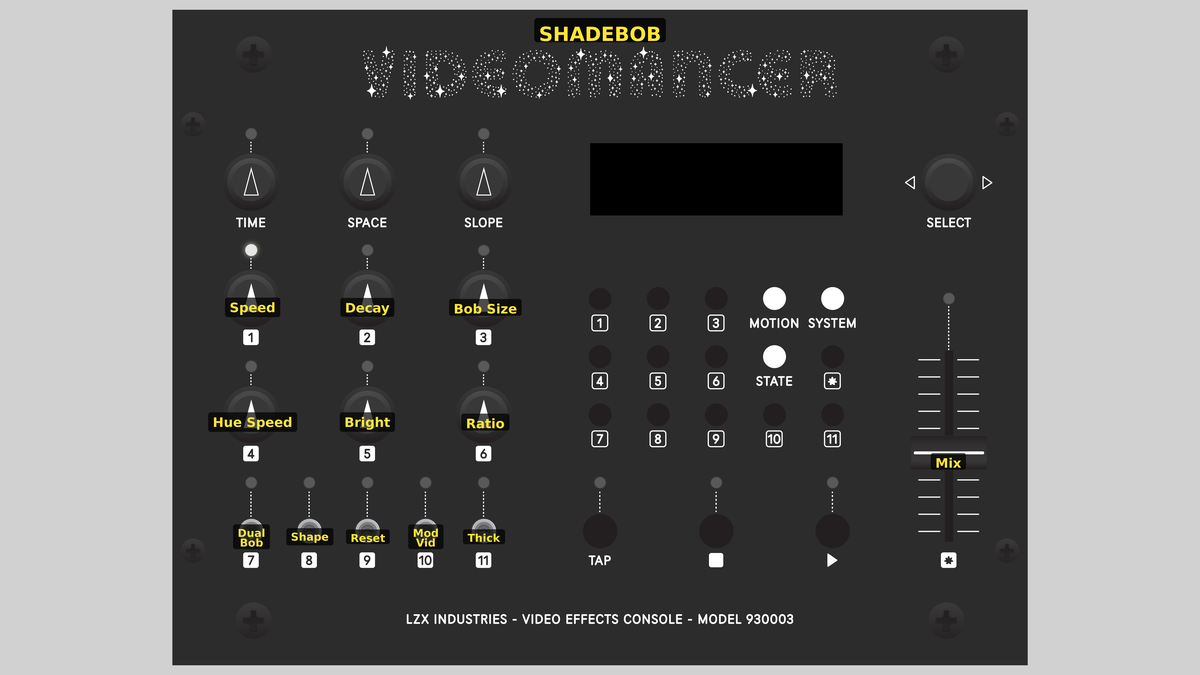 Videomancer's front panel with Shadebob active. Knobs 1–6 (top two rows of left cluster), Toggle switches 7–11 (bottom row of left cluster), Fader 12 (right side).
Knob 1 — Speed
| Property | Value |
|---|---|
| Range | 0% – 100% |
| Default | 38% |
Speed controls the animation rate of the Lissajous trajectory. At 0%, the bob moves very slowly, taking many seconds to complete a single orbit. As Speed increases, the bob accelerates, tracing its path more rapidly and covering more of the framebuffer per second. At 100%, the bob races across the grid, and trails overlap densely even at high decay rates.
Speed interacts with Ratio (Knob 6) to determine the overall trajectory shape. At moderate speeds with a balanced ratio, the bob traces smooth figure-eight patterns. At high speeds, the trail fills the screen before decay can erase it.
Knob 2 — Decay
| Property | Value |
|---|---|
| Range | 0% – 100% |
| Default | 13% |
Decay controls how quickly the framebuffer fades to black. At 0%, there is no decay at all: trails persist indefinitely and the screen gradually fills with saturated color. As Decay increases, the trail lifetime shortens. At 100%, cells fade almost instantly, and only a brief comet tail follows the bob.
Setting Decay to zero and watching the screen fill up is half the fun. Use Reset (Switch 9) to clear the canvas and start fresh.
Knob 3 — Bob Size
| Property | Value |
|---|---|
| Range | 0% – 100% |
| Default | 50% |
Bob Size sets the radius of the blob in framebuffer cells. At 0%, the bob is a small, tight dot with a radius of 2 cells. At 100%, it expands to a large disc with a radius of 9 cells that covers a substantial portion of the 64×36 grid. Larger bobs fill the framebuffer more quickly with each stamp, producing broader, more diffuse trails.
Knob 4 — Hue Speed
| Property | Value |
|---|---|
| Range | 0% – 100% |
| Default | 25% |
Hue Speed controls the rate at which the rainbow palette cycles. At 0%, the palette is static and the bob stamps a single color. As Hue Speed increases, the palette rotates faster, and successive stamps lay down different hues, painting the trail in spectral bands.
In Hue decay mode (Switch 11 set to Hue), each cell retains the color it was given at stamp time, so cycling creates a frozen rainbow trail. In Luma decay mode, all cells share the same live hue, so the entire trail shifts color in unison as the palette cycles.
Knob 5 — Bright
| Property | Value |
|---|---|
| Range | 0% – 100% |
| Default | 75% |
Bright scales the overall luminance of the synthesized output. This is a continuous 10-bit × 10-bit unsigned multiply applied after palette lookup and gamma correction. At 0%, the output is black. At 100%, the palette colors appear at full intensity. Intermediate values dim the entire pattern proportionally.
Knob 6 — Ratio
| Property | Value |
|---|---|
| Range | 0% – 100% |
| Default | 38% |
Ratio biases the Lissajous trajectory between horizontal and vertical motion. At 0%, the bob moves primarily in the horizontal axis, tracing wide sweeps left and right. At 50%, horizontal and vertical speeds are balanced, producing classic figure-eight or circular orbits. At 100%, the bob moves primarily vertically. Shifting the ratio creates elliptical, diagonal, and asymmetric Lissajous figures.
Small changes to Ratio produce dramatically different orbit shapes. Try sweeping it slowly while watching the trail evolve: you'll find figure eights, pretzels, and spirograph-like patterns.
Switch 7 — Dual Bob
| Property | Value |
|---|---|
| Off | Off |
| On | On |
| Default | Off |
Dual Bob enables a second bob positioned at the opposite point of the Lissajous orbit. When the first bob is at the top of its path, the second bob is at the bottom. Both bobs stamp the framebuffer every frame, doubling the trail density and creating mirror-symmetric patterns. With Dual Bob disabled, only one bob is active.
Switch 8 — Shape
| Property | Value |
|---|---|
| Off | Circle |
| On | Diamond |
| Default | Circle |
Shape selects the distance metric used to define the bob's outline. Set to Circle, the bob uses a precomputed Euclidean distance ROM for accurate round shapes. Set to Diamond, the bob uses Manhattan distance (the sum of horizontal and vertical offsets), producing diamond-shaped stamps. Diamond bobs have sharper corners and a tilted-square appearance.
Switch 9 — Reset
| Property | Value |
|---|---|
| Off | Off |
| On | Reset |
| Default | Off |
Reset clears the entire framebuffer to black when toggled from Off to Reset. This erases all accumulated trails instantly, giving you a blank canvas. The bob continues moving from its current position, immediately beginning to paint new trails. Reset is edge-triggered: it fires once on the transition, not continuously while held.
Switch 10 — Mod Vid
| Property | Value |
|---|---|
| Off | Off |
| On | On |
| Default | Off |
Mod Vid enables video modulation. When active, the incoming video signal's luminance modulates the bob's brightness during the rendering pipeline. Bright areas of the input video allow the full bob intensity through; dark areas attenuate it. This stamps the input image's tonal structure onto the synthesized trail pattern, merging external video content with the Lissajous animation.
Mod Vid requires a valid video input signal. Without one, modulation has no effect beyond slightly dimming the output.
Switch 11 — Decay
| Property | Value |
|---|---|
| Off | Hue |
| On | Luma |
| Default | Hue |
Decay selects between two trail coloring modes. Set to Hue, each framebuffer cell retains the palette index it was given at the moment of stamping. As the palette cycles via Hue Speed, the trail becomes a frozen rainbow: each segment keeps its original color while new stamps take on the current hue. Set to Luma, all non-zero cells share the same live palette index. The entire trail shifts color together as the palette cycles, producing a monochromatic pattern that breathes through the spectrum.
Fader 12 — Mix
| Property | Value |
|---|---|
| Range | 0% – 100% |
| Default | 100% |
Mix blends between the dry input signal and the wet synthesized output. At 0%, only the dry input passes through. At 100%, only the Shadebob synthesis is visible. Intermediate values overlay the bob trails onto the input video, allowing the synthesized pattern to float above the source material.
Background
The Amiga demoscene
The demoscene is a computer art subculture that emerged in the 1980s, centered on creating real-time audiovisual demonstrations: demos: that push hardware to its limits. The Commodore Amiga was a defining platform, and the shade bob was one of its most recognizable effects. Programmers used the Amiga's dedicated graphics coprocessor (the Blitter) to perform fast additive pixel compositing, stamping a small sprite onto the screen hundreds of times per frame without erasing previous stamps. The resulting trail of overlapping translucent shapes created mesmerizing, ever-shifting color patterns that became a visual signature of the era.
Lissajous figures
A Lissajous figure is the path traced by a point whose X and Y coordinates each follow independent sinusoidal oscillations. When the two frequencies are related by a simple ratio, the path forms elegant closed curves: figure eights, circles, bow ties, and knots. When the ratio is irrational, the curve never exactly repeats, gradually filling a rectangular region. Shadebob uses two independent phase accumulators driven by Speed and Ratio to generate the bob's trajectory. The result is an endlessly evolving orbital path that sweeps across the framebuffer in complex, non-repeating patterns.
Additive compositing and decay
Shadebob's visual character comes from the interplay between additive compositing and temporal decay. Each frame, the bob stamps a flat intensity value onto every framebuffer cell within its radius, saturating at 255. Simultaneously, every non-zero cell is decremented by a configurable decay step. The result is a dynamic equilibrium: cells near the bob's current position are bright and saturated, while cells in the wake fade gradually through the palette toward black. The tension between accumulation and decay produces the glowing, phosphorescent quality of the trails.
Signal Flow
Signal Flow Notes
The architecture splits into two domains that operate in different time scales. The Lissajous engine runs once per vertical sync, during the blanking interval. It first decays every non-zero cell, then stamps the bob (and optionally a second bob) onto the framebuffer using additive compositing with distance-based range checking. The rendering pipeline runs continuously at the pixel clock, reading the framebuffer and converting cell values through the palette, gamma correction, brightness scaling, and mix stages.
The engine and renderer share the framebuffer BRAM read port. When the engine is active (during vertical blanking), it takes priority and the renderer outputs black. A four-stage busy pipeline ensures the engine mask is correctly aligned with the rendering delay.
The gamma correction at stage R3.5 applies a perceptual intensity curve (intensity²) that concentrates tonal steps in the dim range where the human eye is most sensitive. This produces smoother, more natural-looking fade-outs in the trail.
Exercises
These exercises explore Shadebob's synthesis capabilities from simple trails to complex animated patterns. Since Shadebob is a synthesis program, no video input source is required unless using Mod Vid.
Exercise 1: Basic Trail Painting
Basic Trail Painting — simulated result across source images.
Exercise Illustration
A description of the exercise illustration.
Learning Outcomes
Learn how speed, decay, and bob size interact to create flowing color trails.
Key Concepts
- The bob stamps a flat intensity onto the framebuffer each frame
- Decay removes intensity over time, creating a trail behind the bob
- Bob size controls how much of the grid is painted per stamp
Steps
- Start the bob: Set Speed (Knob 1) to about 40%. A colored blob begins tracing a smooth path.
- Fade the trail: Set Decay (Knob 2) to about 25%. The trail persists for several seconds before fading.
- Widen the brush: Increase Bob Size (Knob 3) to about 60%. The bob grows larger, leaving a wider trail.
- Permanent trails: Now reduce Decay to 0%. The trails never fade (watch the screen gradually fill with color.)
- Clear the canvas: Toggle Reset (Switch 9) to clear the canvas. The bob immediately begins painting again on a black background.
Settings
| Control | Value |
|---|---|
| Speed | 40% |
| Decay | 25% |
| Bob Size | 60% |
| Hue Speed | 0% |
| Bright | 75% |
| Ratio | 50% |
| Dual Bob | Off |
| Shape | Circle |
| Reset | Off |
| Mod Vid | Off |
| Decay | Hue |
| Mix | 100% |
Exercise 2: Rainbow Orbits
Rainbow Orbits — simulated result across source images.
Exercise Illustration
A description of the exercise illustration.
Learning Outcomes
Explore hue cycling and the difference between the two decay modes.
Key Concepts
- Hue mode freezes each cell's color at stamp time, creating rainbow trails
- Luma mode shifts the entire trail's color in unison
- Dual Bob creates mirror-symmetric patterns
Steps
- Base settings: Set Speed to 35%, Decay to 15%, Bob Size to 50%.
- Rainbow ribbon: Turn Hue Speed (Knob 4) to about 30%. The trail becomes a vivid rainbow ribbon (each segment retains the hue it was stamped with.)
- Breathing hue: Now flip Decay mode (Switch 11) to Luma. The entire trail shifts to a single hue that breathes through the spectrum as the palette cycles.
- Mirror symmetry: Flip back to Hue mode. Enable Dual Bob (Switch 7). Two bobs now trace mirror paths, painting parallel rainbow ribbons.
- Reshape the orbit: Slowly sweep Ratio (Knob 6) from 0% to 100%. The orbit transforms from wide horizontal sweeps to tall vertical loops.
Settings
| Control | Value |
|---|---|
| Speed | 35% |
| Decay | 15% |
| Bob Size | 50% |
| Hue Speed | 30% |
| Bright | 80% |
| Ratio | 50% |
| Dual Bob | On |
| Shape | Circle |
| Reset | Off |
| Mod Vid | Off |
| Decay | Hue |
| Mix | 100% |
Exercise 3: Diamond Spirograph
Diamond Spirograph — simulated result across source images.
Exercise Illustration
A description of the exercise illustration.
Learning Outcomes
Combine diamond shapes, dual bobs, and ratio sweeps for complex geometric patterns.
Key Concepts
- Diamond mode uses Manhattan distance, producing angular shapes
- Ratio controls the Lissajous figure's aspect ratio and symmetry
- Low decay with high speed fills the grid with dense, overlapping geometry
Steps
- Quick base setup: Set Speed to 50%, Decay to 10%, Bob Size to 40%.
- Diamond shape: Set Shape (Switch 8) to Diamond. The round blob becomes a tilted square.
- Twin diamonds: Enable Dual Bob (Switch 7). Two diamond bobs trace opposite paths.
- Spirograph orbits: Set Hue Speed to 40% and Ratio to about 30%. The diamonds trace asymmetric orbits, creating spirograph-like interlocking geometry.
- Intensify trails: Slowly increase Bright (Knob 5) from 50% to 100%. The trails intensify from ghostly wisps to vivid neon.
- Crystalline lattice: Toggle Reset (Switch 9), then immediately set Decay to 0% and let the pattern build for 30 seconds. A dense crystalline lattice emerges.
Settings
| Control | Value |
|---|---|
| Speed | 50% |
| Decay | 10% |
| Bob Size | 40% |
| Hue Speed | 40% |
| Bright | 100% |
| Ratio | 30% |
| Dual Bob | On |
| Shape | Diamond |
| Reset | Off |
| Mod Vid | Off |
| Decay | Hue |
| Mix | 100% |
Glossary
-
Additive Compositing: A blending operation where pixel values are added together, allowing overlapping shapes to accumulate brightness and reach saturation.
-
Blitter: The Amiga's dedicated hardware coprocessor for fast block memory transfers and raster operations, enabling real-time compositing effects.
-
Bob: Amiga jargon for Blitter Object: a small graphic element drawn and manipulated by the Blitter hardware.
-
Demoscene: A computer art subculture focused on creating real-time audiovisual demonstrations that showcase programming skill and hardware mastery.
-
Euclidean Distance: The straight-line distance between two points, calculated as the square root of the sum of squared coordinate differences.
-
Framebuffer: A region of memory that stores the pixel data for a complete frame of video, read out continuously during display.
-
Lissajous Figure: A curve traced by a point whose coordinates oscillate sinusoidally at independent frequencies, producing looping, knot-like shapes.
-
Manhattan Distance: The distance between two points measured along grid axes only (no diagonals), producing diamond-shaped equidistant contours.
-
Palette: A lookup table that maps integer index values to specific colors, allowing compact storage and easy color cycling.
-
Phase Accumulator: A counter that adds a fixed increment each cycle, wrapping around to produce a sawtooth ramp used to index periodic functions like sine waves.