Kintsugi
 Kintsugi rendering luminance-detected edge lines in gold over darkened ceramic shards, transforming source video into an ornamental art object.
Overview
Kintsugi is a video edge detector that draws gold or platinum lines along detected boundaries, inspired by the Japanese art of repairing broken pottery with precious metals. Rather than hiding imperfections, Kintsugi celebrates them: every edge in your source video becomes a glowing seam of gold, as if the image were a shattered vessel lovingly rejoined.
Kintsugi analyzes your video in up to four dimensions: horizontal pixel-to-pixel changes, vertical line-to-line differences, an eight-pixel lookback for diagonal and textural contours, and chroma transitions where colors shift abruptly. Where these changes cross a threshold, Kintsugi paints a bright metallic line. Non-edge areas: the "ceramic shards" between cracks: can be darkened, replaced with an embossed relief texture, or aged with a green oxidation patina. The gold lines themselves shimmer subtly thanks to per-pixel dither and a per-frame warmth animation that cycles the tint through a triangular oscillation.
Kintsugi is a processing program. It transforms an input video signal, so you'll need a source connected: a camera, playback, or the output of another Videomancer program upstream in the chain.
What's In a Name?
Kintsugi (金継ぎ) literally translates to "gold joinery." It is a centuries-old Japanese art form in which broken ceramics are repaired with lacquer mixed with powdered gold, silver, or platinum. The philosophy embraces imperfection: the cracks become the most beautiful part of the object. In Videomancer, the "cracks" are edge boundaries detected in the video signal, and the "gold" is a bright, warm-tinted overlay line.
Quick Start
- Feed a source with clear shapes and contrast: a face, a hand, or geometric objects. With default settings you'll see gold edge lines tracing the outlines in the source video.
- Turn Sensitiv (Knob 1) clockwise. More edges appear as the detection threshold drops. Turn it counter-clockwise to isolate only the strongest edges.
- Turn Balance (Knob 6) clockwise from zero. The non-edge "shard" areas darken, making the gold lines stand out against a shadowed background.
- Toggle Glow (Switch 7) to On. The edge detector expands from horizontal-only to multi-dimensional detection including vertical, lookback, and chroma edges (the crack network becomes denser and more intricate.)
Parameters
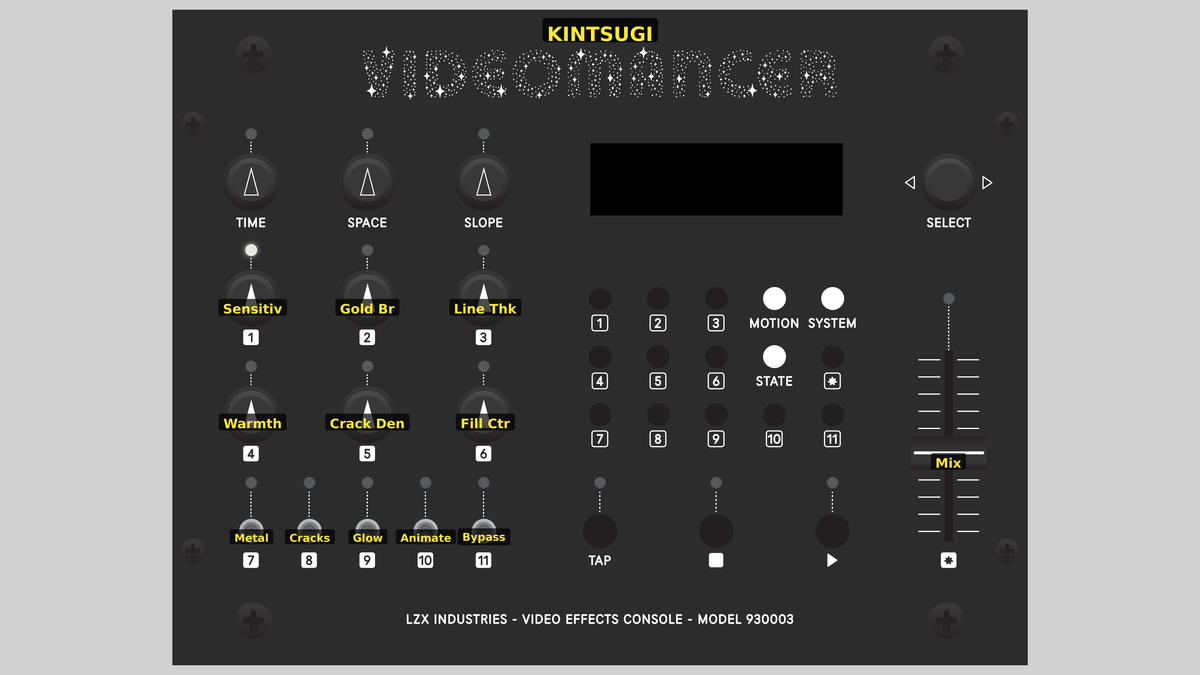 Videomancer's front panel with Kintsugi active. Knobs 1–6 (top two rows of left cluster), Toggle switches 7–11 (bottom row of left cluster), Fader 12 (right side).
Knob 1 — Sensitiv
| Property | Value |
|---|---|
| Range | 0% – 100% |
| Default | 50% |
Sensitiv controls the primary edge detection threshold. At 0%, fully counter-clockwise, the threshold is at its highest: only the most dramatic brightness changes register as edges. As you increase the value clockwise, the threshold drops and progressively subtler transitions are detected. At 100%, even gentle gradients produce visible crack lines.
Start with Sensitiv at its midpoint and adjust while watching your source. High-contrast footage (text, silhouettes) produces clean crack networks at low sensitivity. Soft, organic footage (clouds, skin) needs higher sensitivity to produce visible lines.
Knob 2 — Crack Den
| Property | Value |
|---|---|
| Range | 0% – 100% |
| Default | 50% |
Crack Den (Crack Density) sets an independent threshold for the secondary edge detectors: the eight-pixel lookback, vertical line-to-line comparison, and chroma edge analysis. At 0%, these secondary detectors are extremely selective. Increasing Crack Den lowers their threshold, admitting more diagonal, textural, and color-boundary edges. This control has no effect when Glow (Switch 7) is set to Off, since those secondary detectors are only active in multi-dimensional mode.
Knob 3 — Line Thk
| Property | Value |
|---|---|
| Range | 0% – 100% |
| Default | 50% |
Line Thk (Line Thickness) controls the width of crack lines. At 0%, edges are rendered as single-pixel lines: hairline fractures. As you turn clockwise, a fill counter extends each detected edge horizontally, producing thicker cracks. In Halo mode (Switch 8), thickness creates a graduated glow that fades from full brightness at the edge center to a dim fringe at the border. In Shatter mode, thickness produces a uniform solid fill at full gold intensity.
Knob 4 — Tone
| Property | Value |
|---|---|
| Range | 0% – 100% |
| Default | 50% |
Tone controls the color warmth of the metallic lines. In Gold mode (Switch 9), increasing Tone shifts the lines toward a deeper amber. In Platinum mode, increasing Tone produces a cooler blue-silver. The warmth values are asymmetric: the V (red–cyan) component is approximately 1.5 times the U (blue–yellow) component, producing authentic gold chromaticity. A subtle per-frame triangle-wave animation cycles the warmth slightly, creating a living shimmer.
Knob 5 — Gold Br
| Property | Value |
|---|---|
| Range | 0% – 100% |
| Default | 50% |
Gold Br (Gold Brightness) sets the target luminance for edge pixels. At 0%, edge lines are drawn at the same brightness as the source: they blend in, visible only by their color tint. As you increase the value, the gold lines are driven brighter. At 100%, edges reach near-peak white intensity. Per-pixel LFSR dither adds a fine organic texture to the brightness, preventing the lines from looking perfectly uniform.
Knob 6 — Balance
| Property | Value |
|---|---|
| Range | 0% – 100% |
| Default | 0% |
Balance darkens non-edge pixels: the "ceramic shards" between the cracks. At 0%, shards pass through at their original brightness. Increasing Balance applies a pipelined proc amp contrast reduction, progressively crushing the shard luminance toward black. At 100%, shards are nearly silhouetted, and only the gold crack network remains visible.
Balance is your composition tool. At 0% you get a transparent overlay of gold lines on the source. Push it to 50–70% for a dramatic stained-glass look where the source imagery is visible but subdued. At 100%, the image becomes pure gold calligraphy on a dark field.
Switch 7 — Glow
| Property | Value |
|---|---|
| Off | Off |
| On | On |
| Default | Off |
Glow selects the edge detection mode. When set to Off, only horizontal pixel-to-pixel luminance differences are analyzed, producing clean vertical crack lines. When set to On, the detector expands to include vertical (line-to-line via BRAM line buffer), eight-pixel lookback (diagonal and textural), and chroma (color boundary) edges. Multi-dimensional mode creates a far denser, more organic crack network that follows the full structure of the source.
Switch 8 — Cracks
| Property | Value |
|---|---|
| Off | Halo |
| On | Shatter |
| Default | Halo |
Cracks selects between two line rendering styles. Halo mode produces a graduated glow: the edge center is full brightness, and the line fades smoothly outward according to the Line Thk setting. Shatter mode produces a solid, uniform fill: every pixel within the line width receives full gold intensity. Halo creates a softer, more atmospheric look; Shatter creates a bolder, graphic result.
Switch 9 — Metal
| Property | Value |
|---|---|
| Off | Gold |
| On | Pltnm |
| Default | Gold |
Metal selects the metal color. Gold produces warm amber tint (U below neutral, V above neutral: approximately Y900, U450, V620). Pltnm (Platinum) produces cool blue-silver (U above neutral, V below neutral: approximately Y900, U650, V370). Both metals receive the same per-frame warmth animation and LFSR dither.
Switch 10 — Emboss
| Property | Value |
|---|---|
| Off | Off |
| On | On |
| Default | Off |
Emboss replaces the source imagery in non-edge "shard" areas with a 2D relief texture derived from the maximum of horizontal and vertical edge deltas. When Off, shards show the original (or darkened) source video. When On, shards display a grayscale embossed surface that reveals the underlying texture of the source as a bas-relief sculpture. Emboss interacts with Balance: the proc amp darkening is applied to the emboss texture, not the original source.
Switch 11 — Patina
| Property | Value |
|---|---|
| Off | Off |
| On | On |
| Default | Off |
Patina applies a luma-dependent green oxidation tint to non-edge shard areas, simulating the aged surface of weathered copper or bronze. Darker source areas receive a stronger green shift, producing a realistic graduated patina effect. When Off, shards retain their original color. When On, the U channel is shifted downward (toward green) proportional to darkness, and the V channel is shifted down by half that amount for a cooling effect.
Patina and Emboss can be combined. With both active, shards display an embossed relief surface with green oxidation, creating the appearance of an ancient bronze artifact.
Fader 12 — Mix
| Property | Value |
|---|---|
| Range | 0.0% – 100.0% |
| Default | 100.0% |
Mix crossfades between the dry (unprocessed) input and the wet (processed) output. At 0%, the output is identical to the input. At 100%, the full Kintsugi effect is applied. Intermediate values blend the two proportionally, allowing you to dial in the effect intensity.
Background
Edge detection
Edge detection is a fundamental technique in image analysis. An edge is a location where pixel values change abruptly: a boundary between regions of different brightness or color. The simplest edge detector computes the absolute difference between adjacent pixels: if the difference exceeds a threshold, an edge is declared. Kintsugi uses this basic principle across four dimensions.
Horizontal edges measure |Y[n] - Y[n-1]|, finding boundaries that run vertically through the image. Vertical edges use a BRAM line buffer to compare the current pixel with the same horizontal position on the previous scan line, finding horizontal boundaries. The eight-pixel lookback computes |Y[n] - Y[n-8]|, catching diagonal contours and textural patterns that the single-pixel detectors miss. Chroma edges take max(|U[n]-U[n-1]|, |V[n]-V[n-1]|), finding color boundaries where brightness may be constant.
Gold composition
When a pixel is classified as an edge, Kintsugi replaces its color with a metallic target. The gold target is constructed as a bright Y value (set by Gold Br) with warm UV offsets that shift U below the neutral midpoint and V above it, producing amber. Platinum inverts this: U above neutral, V below: for cool silver-blue.
The per-pixel LFSR dither XORs the three least-significant bits of the brightness target, creating a fine organic grain that prevents the gold from looking digitally flat. The per-frame triangle wave phase accumulator modulates the warmth offsets, producing a subtle cyclic shimmer visible over time.
For thick lines (fill counter > 0), Halo mode attenuates the gold brightness by progressively larger right-shifts as the fill counter counts down from the edge, producing a graduated glow. Shatter mode maintains full brightness across the entire fill width.
Shard processing
Non-edge pixels: the "ceramic shards": pass through a pipelined proc amp that applies contrast reduction controlled by Balance. At maximum balance, the contrast multiplier approaches zero, crushing shard luminance toward black. The proc amp uses a Radix-4 Booth multiplier with 9 pipeline stages for timing closure.
The Emboss toggle replaces shard source Y with a relief value computed from max(|dY_horizontal|, |dY_vertical|), scaled to full range. This reveals the gradient structure of the source as a sculptural texture. Patina shifts the U and V channels of shards toward green proportional to pixel darkness, simulating copper oxidation that is heavier in shadowed recesses (a physically accurate model of how real patina accumulates.)
Signal Flow
Signal Flow Notes
The architecture has two parallel processing paths that reunite at Stage 16. Edge pixels follow the compose path: brightness is blended toward the dithered gold target with a fade shift determined by the fill counter, and chrominance is replaced with the gold/platinum UV target. Non-edge pixels are routed through a pipelined proc amp for darkening. Stage 6 generates both compose and proc amp inputs simultaneously; the nine-stage alignment delay chain ensures they arrive at the final select multiplexer at the same clock cycle.
The four-clock crack centering offset delays only the sync and dry paths, shifting the processed output leftward relative to sync. This causes the gold line to appear centered on the detected edge rather than displaced to the right (a subtle but important visual improvement.)
Exercises
These exercises progress from basic edge overlay to full ornamental composition. Each builds on the previous, adding more of Kintsugi's processing layers.
Exercise 1: Gold Edge Tracing
 Gold Edge Tracing — simulated result across source images.
Exercise Illustration
A description of the exercise illustration.
Learning Outcomes
Learn how the edge threshold and detection mode interact to produce crack networks of varying density.
Key Concepts
- Edge detection compares adjacent pixel values against a threshold
- Multi-dimensional mode adds vertical, lookback, and chroma edges
- Sensitivity and Crack Density control primary and secondary thresholds independently
Video Source
A live camera feed or recorded footage with clear shapes (faces, hands, architecture, or text.)
Steps
- Default gold edges: Start with all defaults. Gold lines trace the strongest horizontal edges in the source.
- Reveal finer edges: Slowly increase Sensitiv (Knob 1). Subtler edges appear (fine wrinkles, fabric textures, background details.)
- Multi-dimensional cracks: Toggle Glow (Switch 7) to On. The crack network explodes with vertical and diagonal lines.
- Tune secondary edges: With Glow on, increase Crack Den (Knob 2) to add more secondary edges. Lower it to isolate only the strongest multi-dimensional boundaries.
- Switch to platinum: Toggle Metal (Switch 9) to Pltnm. The lines shift from warm amber to cool silver-blue.
Settings
| Control | Value |
|---|---|
| Sensitiv | 50% |
| Crack Den | 50% |
| Line Thk | 0% |
| Tone | 50% |
| Gold Br | 50% |
| Balance | 0% |
| Glow | On |
| Cracks | Halo |
| Metal | Gold |
| Emboss | Off |
| Patina | Off |
| Mix | 100% |
Exercise 2: Stained Glass Composition
 Stained Glass Composition — simulated result across source images.
Exercise Illustration
A description of the exercise illustration.
Learning Outcomes
Combine edge lines with shard darkening and patina to create an ornamental stained-glass aesthetic.
Key Concepts
- Balance darkens non-edge areas via proc amp contrast reduction
- Patina adds luma-dependent green oxidation to shards
- Line Thickness and Halo/Shatter control line rendering style
Video Source
Footage with broad tonal regions and moderate contrast (landscapes, still life, or slow-moving subjects.)
Steps
- Darken the shards: Set Balance (Knob 6) to about 70%. The areas between cracks darken dramatically.
- Widen the cracks: Increase Line Thk (Knob 3) to about 40%. The crack lines thicken into glowing bands.
- Brighten the gold: Increase Gold Br (Knob 5) to about 70%. The gold lines become more luminous.
- Compare line styles: Toggle Cracks (Switch 8) between Halo and Shatter. Halo produces atmospheric glow; Shatter produces bold, graphic strokes.
- Age the surface: Toggle Patina (Switch 11) to On. The darkened shards acquire a green oxidation tint, strongest in the shadows.
- Deepen the amber: Adjust Tone (Knob 4) to shift the gold warmth. Higher values produce deeper amber.
Settings
| Control | Value |
|---|---|
| Sensitiv | 50% |
| Crack Den | 50% |
| Line Thk | 40% |
| Tone | 70% |
| Gold Br | 70% |
| Balance | 70% |
| Glow | On |
| Cracks | Halo |
| Metal | Gold |
| Emboss | Off |
| Patina | On |
| Mix | 100% |
Exercise 3: Bronze Relief Artifact
 Bronze Relief Artifact — simulated result across source images.
Exercise Illustration
A description of the exercise illustration.
Learning Outcomes
Use Emboss and Patina together to transform the source into an aged metallic artifact.
Key Concepts
- Emboss replaces shard source with a 2D relief texture derived from edge deltas
- Patina and Emboss combine for an ancient bronze aesthetic
- Platinum mode offers a different metallic character
Video Source
High-detail footage (close-up textures, nature, or architectural details.)
Steps
- Sculpt the surface: Toggle Emboss (Switch 10) to On. Non-edge areas are replaced with a grayscale relief texture.
- Shadow the relief: Set Balance (Knob 6) to about 40%. The embossed relief darkens into shadow.
- Oxidize the bronze: Toggle Patina (Switch 11) to On. The embossed surface acquires verdigris oxidation.
- Cool the metal: Switch Metal (Switch 9) to Pltnm. The crack lines shift to cool silver, contrasting against the warm green patina.
- Dense seam network: Increase Sensitiv (Knob 1) and Crack Den (Knob 2) to about 80%. A dense network of platinum seams covers the relief surface.
- Ghost overlay: Adjust Mix (Fader 12) to about 60% to blend the artifact with the original source, creating a ghostly overlay.
Settings
| Control | Value |
|---|---|
| Sensitiv | 80% |
| Crack Den | 80% |
| Line Thk | 30% |
| Tone | 50% |
| Gold Br | 60% |
| Balance | 40% |
| Glow | On |
| Cracks | Halo |
| Metal | Pltnm |
| Emboss | On |
| Patina | On |
| Mix | 60% |
Glossary
-
BRAM: Block RAM; dedicated memory blocks on the FPGA used to store one full scan line of pixel data for vertical edge comparison.
-
Chroma: The color information in a video signal, encoded as U and V components in YUV color space.
-
Edge Detection: Identifying pixel locations where brightness or color values change abruptly, indicating a boundary between regions.
-
Emboss: A relief texture effect that replaces flat imagery with a raised/lowered surface based on local gradient magnitude.
-
Fill Counter: A per-pixel countdown that extends a detected edge horizontally, producing thicker crack lines.
-
LFSR: Linear Feedback Shift Register; a hardware pseudo-random number generator used to add organic dither texture to gold brightness.
-
Luma: The brightness component (Y) of a YUV video signal, representing perceived lightness.
-
Patina: A green oxidation tint applied to darker areas, simulating the aged surface of weathered copper or bronze.
-
Proc Amp: Processing Amplifier; a gain-and-offset stage that applies contrast reduction to darken non-edge shard pixels.
-
Threshold: A comparison value that determines whether a pixel-to-pixel difference is large enough to classify as an edge.