Fauxtress
 Fauxtress applying phase-accumulator decimation, BRAM delay echo, and XOR phase wrapping to sculpt shifting digital interference textures from a video source.
Overview
Fauxtress is a shift register image manipulator built around three phase accumulators and a BRAM delay line. It reimagines the LZX Fortress module's core architecture: originally a standalone pattern generator: as a video processing engine. The horizontal and vertical accumulators drive clocked sample-and-hold decimation of the input video, while an animation accumulator adds a slowly drifting phase offset that evolves the image over time.
What sets Fauxtress apart from a simple pixelator is its feedback loop. A variable delay line stores up to 512 pixels of luminance history, and a feedback mixer recirculates that history back into the processing chain. The result is iterative accumulation: each frame builds on echoes of the previous one, producing textures that shift and crystallize like a digital mineral deposit. Combined with the Fortress-style XOR phase wrap, Fauxtress generates evolving interference patterns that are responsive to the input video but distinctly alien.
At subtle settings, Fauxtress adds shimmering texture and gentle spatial echo to a source. At extreme settings, it tears the image apart into self-referencing noise fields, cellular structures, and cascading bit patterns that bear only a ghostly relation to the original.
The feedback loop is what makes this program unique. Even small amounts of Feedback cause the image to develop emergent patterns over time (structures that didn't exist in the source.)
What's In a Name?
The name Fauxtress is a portmanteau of faux (false, imitation) and Fortress, the classic LZX Industries module. It's a "false Fortress": a program that borrows the Fortress phase accumulator architecture but repurposes it for video processing rather than standalone pattern synthesis. Where the original Fortress generated its own imagery from scratch, Fauxtress takes an existing video signal and reshapes it through the same accumulator-driven decimation engine.
Quick Start
- Turn Depth (Knob 6) fully clockwise to engage the decimation engine. Sweep H Rate (Knob 1) and V Rate (Knob 2) to break the input image into shifting horizontal and vertical bands. The image pixelates and pulses as the accumulators sweep through different frequencies.
- Increase Delay (Knob 4) to about halfway and raise Feedback (Knob 5) slowly. The image develops ghostly echoes and repeating structures as the delay line recirculates luminance data back into the processing chain.
- Enable Phase Wrap (Switch 10). The animation accumulator's output begins XORing with the processed data, introducing slowly drifting diagonal interference fringes: the signature Fortress effect, now modulating your video source.
- Adjust Anim Rate (Knob 3) to control the speed of the phase drift. Lower values produce glacial, meditative evolution; higher values create rapid, flickering interference.
Parameters
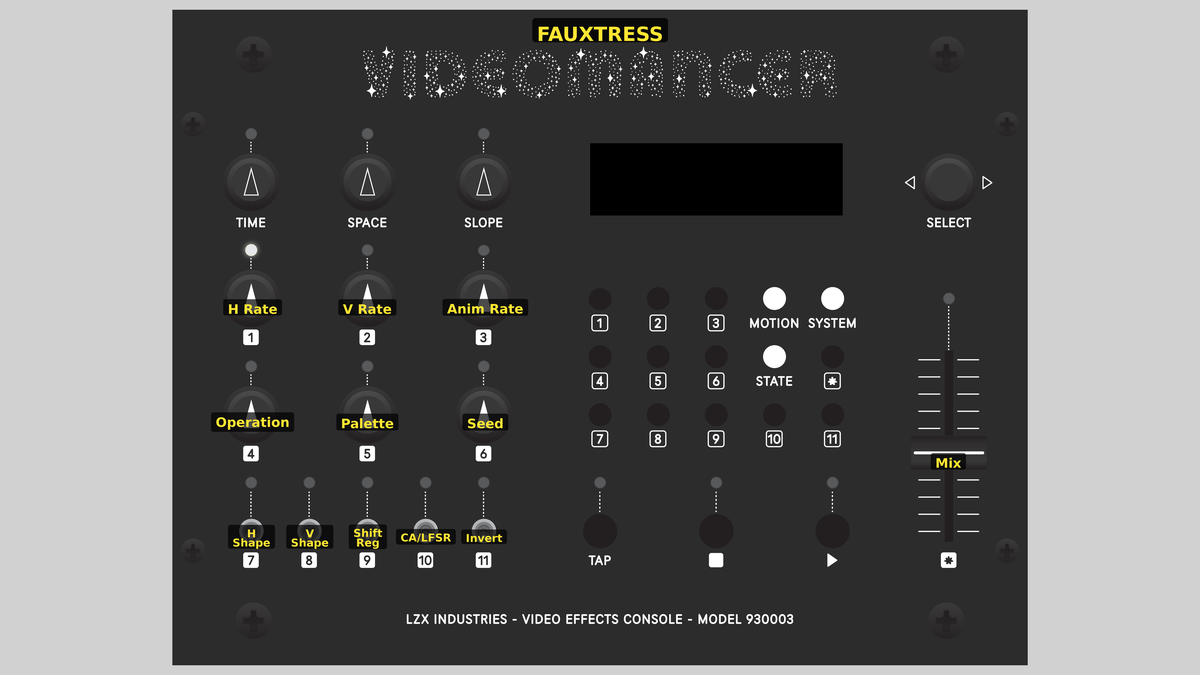 Videomancer's front panel with Fauxtress active. Knobs 1–6 (top two rows of left cluster), Toggle switches 7–11 (bottom row of left cluster), Fader 12 (right side).
Knob 1 — H Rate
| Property | Value |
|---|---|
| Range | 0 – 1023 |
| Default | 512 |
H Rate sets the frequency of the horizontal phase accumulator, which drives the horizontal sample-and-hold decimation clock. At 0, the accumulator pulses at its lowest rate, producing wide horizontal bands of held color. As the value increases, the pulse rate rises and the bands become narrower and more numerous. At 1023, the pulse fires nearly every pixel and the input passes through with minimal horizontal decimation.
The accumulator is a 16-bit phase register that overflows periodically. This means that the decimation frequency doesn't increase linearly: it aliases and wraps, producing interesting rhythmic patterns as you sweep the knob. Certain "sweet spots" create regular grids; the gaps between them produce chaotic, shifting boundaries.
Knob 2 — V Rate
| Property | Value |
|---|---|
| Range | 0 – 1023 |
| Default | 512 |
V Rate sets the frequency of the vertical phase accumulator, controlling vertical sample-and-hold decimation. At low values, many consecutive scanlines display the same held data, producing thick horizontal stripes. At high values, vertical detail is preserved and stripes become thinner. At 1023, nearly every scanline is captured, disabling vertical decimation.
V Rate and H Rate together define the grid geometry of the decimation pattern. Nearly equal values create roughly square blocks; unequal values create elongated rectangles or thin slivers. Both accumulators alias independently, so sweeping one while the other is fixed produces mesmerizing moiré beating effects.
Knob 3 — Anim Rate
| Property | Value |
|---|---|
| Range | 0 – 1023 |
| Default | 0 |
Anim Rate controls the speed of the animation phase accumulator: a free-running low-frequency oscillator (LFO) that increments once per frame. At 0, the animation phase is frozen and Phase Wrap has no visible effect. As the value increases, the animation phase drifts faster, causing the XOR interference to sweep across the image. At maximum, the phase cycles rapidly, creating flickering, stroboscopic patterns.
Anim Rate has no visible effect unless Phase Wrap (Switch 10) is enabled. Without phase wrapping, the animation accumulator runs silently in the background.
Knob 4 — Delay
| Property | Value |
|---|---|
| Range | 0 – 511 |
| Default | 128 |
Delay sets the depth of the BRAM variable delay line, ranging from 0 to 511 pixels. At 0, the delay line returns the current pixel immediately. As the value increases, the output is an echo of pixels further in the past, creating spatial offset and smearing effects in the luminance channel. At 511, the echo is displaced by up to 511 pixels (roughly one-third of a standard-definition scanline.)
The delay line stores luminance only. Chroma passes through the processing chain without delay, so increasing Delay creates a separation between brightness and color information, producing chromatic ghosting and displacement effects.
Knob 5 — Feedback
| Property | Value |
|---|---|
| Range | 0% – 100% |
| Default | 0% |
Feedback controls how much of the delayed luminance is mixed back into the input of the delay line. At 0%, no recirculation occurs: the delay line produces a single echo. At higher values, the echo feeds back into itself, creating iterative accumulation. The feedback mixer uses saturating addition, meaning the combined signal clips at maximum brightness rather than wrapping around.
The feedback path uses a coarse four-level blend: 0% (off), 25%, 50%, and 100%. Small amounts of feedback add subtle texture buildup. Full feedback drives the signal toward saturation, producing high-contrast self-reinforcing patterns that grow and crystallize over time.
High feedback values combined with long delay times can produce very bright, saturated output. The signal accumulates toward full white as the feedback loop reinforces itself. Reduce Mix (Fader 12) to tame the intensity.
Knob 6 — Depth
| Property | Value |
|---|---|
| Range | 0% – 100% |
| Default | 50% |
Depth blends between the raw input video and the horizontally decimated output. At 0, the decimation engine is fully bypassed and the raw input passes through. At maximum, the signal is fully decimated by the H Rate accumulator. The blend uses a coarse four-level crossfade: 0–255 (raw), 256–511 (25% decimated), 512–767 (75% decimated), and 768–1023 (fully decimated).
Think of Depth as a "how much Fauxtress" control. At low settings, only the delay line, feedback, and phase wrap affect the signal. At high settings, the phase-accumulator decimation is fully engaged, producing the characteristic blocky, shifting patterns.
Switch 7 — H Lock
| Property | Value |
|---|---|
| Off | Free |
| On | Lock |
| Default | Lock |
H Lock controls whether the horizontal phase accumulator resets at the start of each scanline. With the switch set to Lock, the accumulator resets on every horizontal sync pulse, producing a pattern that is stable and aligned to the raster. Set to Free, the accumulator runs continuously across scanlines, and the decimation pattern drifts and wraps in unpredictable ways.
Locked accumulators produce tidy, repeatable grid patterns. Free-running accumulators produce organic, shifting textures that change from frame to frame. Try starting with Lock to understand the effect, then switching to Free for performance.
Switch 8 — V Lock
| Property | Value |
|---|---|
| Off | Free |
| On | Lock |
| Default | Lock |
V Lock controls whether the vertical phase accumulator resets at the start of each frame. Set to Lock, the vertical decimation pattern is stable from frame to frame. Set to Free, the accumulator free-runs across frames, and the vertical band positions drift over time. Combined with H Lock in Free mode, both axes drift independently, producing a mesmerizing, slowly migrating grid.
Switch 9 — Luma Src
| Property | Value |
|---|---|
| Off | Osc |
| On | Video |
| Default | Osc |
Luma Src selects the clock source for horizontal decimation. With the switch set to Osc, the H Rate phase accumulator drives the sample-and-hold clock: the default oscillator-driven mode. Set to Video, the input video's luminance transitions drive the clock instead: every time the brightness crosses the midpoint threshold, a decimation pulse fires.
In Video mode, the horizontal decimation becomes content-adaptive. Busy, high-contrast areas generate frequent pulses and fine detail, while flat regions hold longer and produce wider bands. The image's brightness contours directly shape the decimation grid.
Switch 10 — Phase Wrap
| Property | Value |
|---|---|
| Off | Off |
| On | On |
| Default | Off |
Phase Wrap enables the Fortress-style XOR coupling between the animation accumulator and the processed video data. When enabled, the upper bits of the animation phase accumulator are XORed with the depth-blended pixel values at the bit level. The animation phase shifts slowly (controlled by Anim Rate), flipping different bits each frame and producing evolving interference patterns: diagonal fringes, strobing regions, and slowly mutating digital textures.
This is the signature Fortress effect. The XOR operation scrambles pixel values in a structured, repeating way that creates complex visual interference from simple phase relationships.
Switch 11 — Invert
| Property | Value |
|---|---|
| Off | Off |
| On | On |
| Default | Off |
Invert reverses the luminance and chrominance of the processed output. All three channels (Y, U, V) are inverted by subtracting each value from 1023. This creates a photographic-negative effect applied after all other processing stages: including decimation, phase wrap, feedback, and vertical decimation: but before the dry/wet mix.
Invert affects all three channels simultaneously. Because U and V are also inverted, colors shift as well as brightness (warm tones become cool, and vice versa.)
Fader 12 — Mix
| Property | Value |
|---|---|
| Range | 0.0% – 100.0% |
| Default | 100.0% |
Mix crossfades between the unprocessed input video and the fully processed output. At 0%, only the dry input signal is heard. At 100%, only the processed signal passes through. The crossfade uses an interpolator matched to the processing pipeline's latency, so there are no timing glitches when adjusting the fader.
Mix is your master intensity control. Use it to blend Fauxtress textures subtly into a source, or push it to full wet for maximum effect. During performance, sweeping the fader creates smooth transitions between the raw and processed worlds.
Background
Phase Accumulators
A phase accumulator is a counter that adds a fixed increment on every clock cycle and wraps around when it overflows. The overflow rate: the frequency at which the counter resets to zero: is proportional to the increment value. Larger increments produce faster overflow and higher frequencies. Phase accumulators are the core of numerically controlled oscillators (NCOs), used in everything from radio transmitters to music synthesizers.
Fauxtress uses three independent phase accumulators. The horizontal and vertical accumulators drive sample-and-hold decimation: their overflow pulses determine when a new pixel or scanline is captured. The animation accumulator is a per-frame LFO whose phase is used for the XOR coupling effect. All three accumulators are 16-bit, and the parameter value (10-bit) occupies the top bits of the increment register.
Delay Line Feedback
The BRAM variable delay line at the heart of Fauxtress is a shift register: a first-in, first-out buffer that outputs data written N clock cycles ago. By feeding the output back into the input through a mixer, the delay line becomes a recirculating buffer. Each pass through the loop adds the current input to the echo of a previous state, building up layered textures over time.
This is the same principle behind audio delay and reverb effects, adapted to the pixel domain. The key difference is that the delay operates on luminance only and the feedback is additive with saturation, meaning the signal accumulates toward white rather than decaying. The result is a bright, crystalline buildup rather than a fading echo.
The Fortress Legacy
The original LZX Fortress was a hardware module built around phase accumulators driving a pattern generator. Its signature effect was the slowly drifting diagonal interference pattern produced by XORing an animation oscillator with the output. Fauxtress preserves this architecture but replaces the internal pattern generator with an external video input, turning a synthesis engine into a processing engine.
The Phase Wrap toggle enables the same XOR coupling used in the original Fortress. The animation accumulator's output is XORed with the processed video data at the bit level. Because XOR flips specific bits based on the accumulator's phase, and the phase shifts slowly over time, the result is an evolving pattern of bit-level interference that sweeps across the image.
Signal Flow
Signal Flow Notes
Three key architectural details shape the sound of Fauxtress:
-
Feedback loop topology: The feedback path wraps around the delay line only: stages 6 through 8. The delay line stores luminance only; chroma bypasses the delay and feedback entirely. This means that feedback accumulation affects brightness patterns while color remains a single-pass transformation. The saturating addition in the feedback mixer clips at 1023, so the feedback loop drives toward white rather than wrapping.
-
Depth blend position: The Depth crossfade sits before the phase wrap and feedback stages. This means that at low Depth values, the raw input feeds into the phase wrap and delay line. The feedback loop still operates even when decimation is minimal, so you can use the delay echo without the blocky accumulator patterns.
-
V Decimation placement: Vertical decimation happens after the delay line, not before. This means the delay line processes every scanline at full vertical resolution, and V Rate only affects the final output. Changing V Rate doesn't alter the feedback loop's content (it just changes how the result is displayed.)
The feedback loop is luminance-only. Chroma follows a simpler path: H Decimation → Depth Blend → Phase Wrap → V Decimation → Invert → Mix. No delay, no feedback. This asymmetry is intentional: the luminance feedback creates complex evolving patterns while chroma stays responsive to the controls.
Exercises
These exercises progress from basic decimation to feedback-driven texture synthesis, gradually engaging more of the processing chain. Each builds on skills from the previous one.
Exercise 1: Accumulator Grid
 Accumulator Grid — simulated result across source images.
Exercise Illustration
A description of the exercise illustration.
Learning Outcomes
Learn how the H and V phase accumulators create spatial decimation patterns, and how locking affects stability.
Key Concepts
- Phase accumulators produce periodic pulses that clock sample-and-hold
- Locked accumulators create stable, raster-aligned grids
- Free-running accumulators drift across frames
Video Source
A live camera feed or recorded footage with recognizable subjects and moderate contrast.
Steps
- Engage decimation: Set Depth (Knob 6) fully clockwise to engage full decimation. Set Feedback (Knob 5) to 0% and Delay (Knob 4) to 0 so the delay line is inactive.
- Horizontal sweep: Slowly sweep H Rate (Knob 1) from minimum to maximum. The image breaks into vertical bands that shift and alias as the accumulator wraps. Notice the "sweet spots" where the grid becomes regular.
- Add vertical bands: Now sweep V Rate (Knob 2). Horizontal stripes appear and shift. With both knobs at moderate values, a blocky mosaic forms.
- Lock vs. free: Toggle H Lock (Switch 7) between Lock and Free. In Lock mode, the horizontal pattern is stable. In Free mode, it drifts and shimmers.
- Drifting grid: Toggle V Lock (Switch 8) similarly. With both locks off, the entire grid migrates slowly (a meditative, organic effect.)
Settings
| Control | Value |
|---|---|
| H Rate | ~400 |
| V Rate | ~400 |
| Anim Rate | 0 |
| Delay | 0 |
| Feedback | 0% |
| Depth | 1023 |
| H Lock | Lock |
| V Lock | Lock |
| Luma Src | Osc |
| Phase Wrap | Off |
| Invert | Off |
| Mix | 100% |
Exercise 2: Delay Echo and Feedback
 Delay Echo and Feedback — simulated result across source images.
Exercise Illustration
A description of the exercise illustration.
Learning Outcomes
Explore the BRAM delay line and feedback loop to create self-reinforcing luminance textures.
Key Concepts
- The delay line creates pixel-offset echo effects
- Feedback recirculates the delayed signal, building up brightness patterns
- Saturating addition drives the image toward white at high feedback
Video Source
High-contrast footage such as silhouettes, text, or graphic patterns.
Steps
- Moderate mosaic: Start with moderate decimation: H Rate ~500, V Rate ~500, Depth fully clockwise.
- Add echo offset: Increase Delay (Knob 4) to about halfway (~256). The image develops a horizontal ghost (a shifted echo of the luminance.)
- Build up texture: Slowly raise Feedback (Knob 5). At 25%, subtle texture builds up over successive frames. At 50%, patterns begin to self-reinforce. At 100%, bright areas accumulate rapidly toward full white, creating high-contrast crystalline structures.
- Shift the echo: Sweep Delay while feedback is active. The spatial offset of the echo shifts, causing the accumulation pattern to reorganize in real time.
- Reduce pixelation: Reduce Depth (Knob 6) toward zero. The decimation fades but the delay and feedback continue operating on the less-pixelated signal (notice how the echo texture changes character.)
Settings
| Control | Value |
|---|---|
| H Rate | ~500 |
| V Rate | ~500 |
| Anim Rate | 0 |
| Delay | ~256 |
| Feedback | 50% |
| Depth | 1023 |
| H Lock | Lock |
| V Lock | Lock |
| Luma Src | Osc |
| Phase Wrap | Off |
| Invert | Off |
| Mix | 100% |
Exercise 3: Phase Wrap Interference
 Phase Wrap Interference — simulated result across source images.
Exercise Illustration
A description of the exercise illustration.
Learning Outcomes
Engage the Fortress-style XOR phase wrap to produce evolving interference patterns layered over the processed video.
Key Concepts
- XOR flips specific bits based on the animation phase
- The animation accumulator drifts per-frame, creating slowly evolving patterns
- Phase wrap interacts with decimation and feedback to produce complex emergent textures
Video Source
Any footage: abstract or representational. High-contrast material produces the most dramatic interference.
Steps
- Feedback baseline: Start from the Exercise 2 settings with moderate feedback active.
- XOR interference: Enable Phase Wrap (Switch 10). Diagonal interference fringes appear, superimposed on the decimated, echoed image.
- Drift the fringes: Increase Anim Rate (Knob 3) slowly from 0. The interference begins drifting across the image. At low values, the drift is glacial and hypnotic. At higher values, it flickers and strobes.
- Content-adaptive clock: Toggle Luma Src (Switch 9) to Video. The horizontal decimation clock now follows the input's brightness contours. The interference fringes bend and warp according to the source content.
- Invert polarity: Enable Invert (Switch 11) to flip the output polarity. The bright accumulation patterns become dark voids; the interference fringes reverse contrast.
- Blend with source: Sweep Mix (Fader 12) to blend the processed texture with the raw input. At about 50%, the Fauxtress texture floats translucently over the source.
Settings
| Control | Value |
|---|---|
| H Rate | ~500 |
| V Rate | ~500 |
| Anim Rate | ~300 |
| Delay | ~256 |
| Feedback | 50% |
| Depth | 1023 |
| H Lock | Free |
| V Lock | Free |
| Luma Src | Video |
| Phase Wrap | On |
| Invert | Off |
| Mix | 100% |
Glossary
-
Accumulator: A register that adds a fixed increment on each clock cycle and wraps on overflow; the basis of a numerically controlled oscillator.
-
Decimation: Reducing spatial resolution by discarding samples at regular intervals, producing a blocky mosaic effect.
-
Delay Line: A first-in, first-out buffer that outputs data written a configurable number of clock cycles in the past.
-
Feedback: Recirculation of a delayed output back into the input, creating iterative accumulation patterns.
-
LFO: Low-Frequency Oscillator; a slow periodic signal used to modulate parameters over time.
-
Moiré: An interference pattern produced when two periodic structures overlap at slightly different frequencies or angles.
-
Phase Accumulator: A digital counter whose overflow frequency is proportional to its increment value, generating periodic pulses.
-
Sample-and-Hold: A circuit that captures an input value on a trigger pulse and holds it constant until the next trigger.
-
Saturating Addition: An addition operation that clips the result at the maximum representable value instead of wrapping around.
-
Shift Register: A sequential storage element where data enters at one end and exits at the other after a fixed number of clock cycles.
-
XOR: Exclusive-OR; a bitwise logic operation that flips bits where the two operands differ.