Corollas
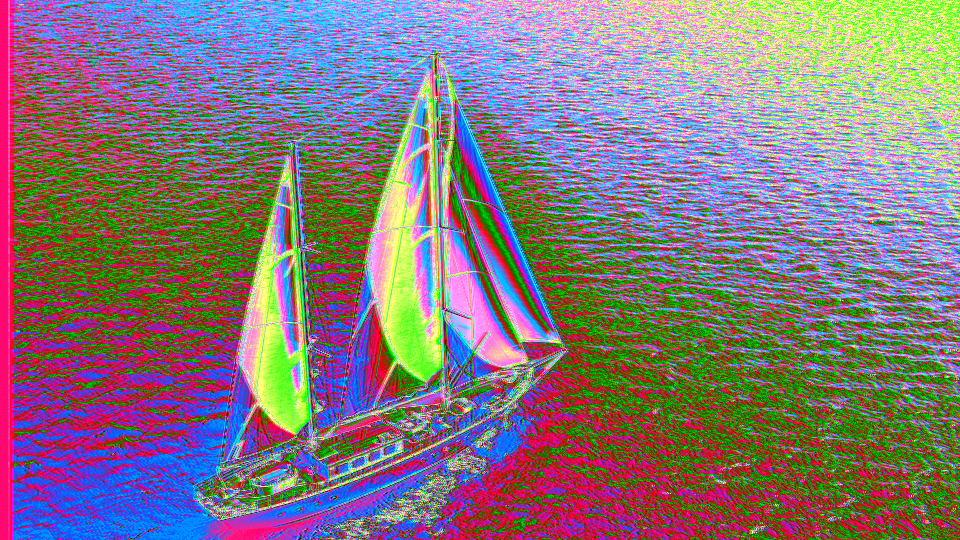 Corollas transforming luminance gradients into layered harmonic petal patterns across Y, U, and V color channels.
Overview
Corollas is a harmonic video processor that splits input luminance into four frequency-doubled layers and distributes them across the Y, U, and V channels. Its core operation is frequency folding: the input signal is reflected at its midpoint, converting ramps into triangles and triangles into higher-frequency triangles. Cascading four of these stages creates harmonics at 2×, 4×, 8×, and 16× the input frequency. The lower two harmonics form luminance; the upper two generate chrominance.
The result is a transformation that turns even simple gradients into complex, symmetrical interference patterns. Adjusting the input contrast and offset changes how the folding maps across the brightness range, while per-harmonic hue offsets and inversion toggles let you sculpt the exact shape and color of each petal layer. At subtle settings, Corollas adds gentle colorization and tonal shaping. At extreme settings, it produces vivid kaleidoscopic textures with intricate, flower-like symmetry.
Harmonics are the signature effect. The four frequency-doubled layers create mathematically precise symmetry in the output. Each harmonic is phase-locked to the input, so the patterns always track the source content.
What's In a Name?
A corolla is the collective term for all the petals of a flower: the colorful ring that surrounds the center. The name captures the program's essence: each frequency-doubled harmonic creates a symmetrical, petal-like pattern, and the four layers together unfold like an opening bloom. The plural Corollas emphasizes the multiplicity: four nested layers of petals, each at a different frequency and mapped to a different color axis.
Quick Start
- Feed a video signal with clear tonal variation. Turn Span (Knob 4) clockwise to increase the input contrast. Watch as symmetrical patterns emerge: bright and dark regions fold into repeated shapes like petals unfurling.
- Slowly turn Hue 3 (Knob 5) and Hue 4 (Knob 6) clockwise. Color appears in the image as the higher-frequency harmonics shift the U and V channels away from neutral.
- Sweep Offset (Knob 1) from one extreme to the other. The folding point shifts through the brightness range, and the entire pattern slides and reshapes in response.
- Toggle Invert Span (Switch 7). The base signal flips, and every harmonic layer reacts, producing the complementary petal arrangement.
Parameters
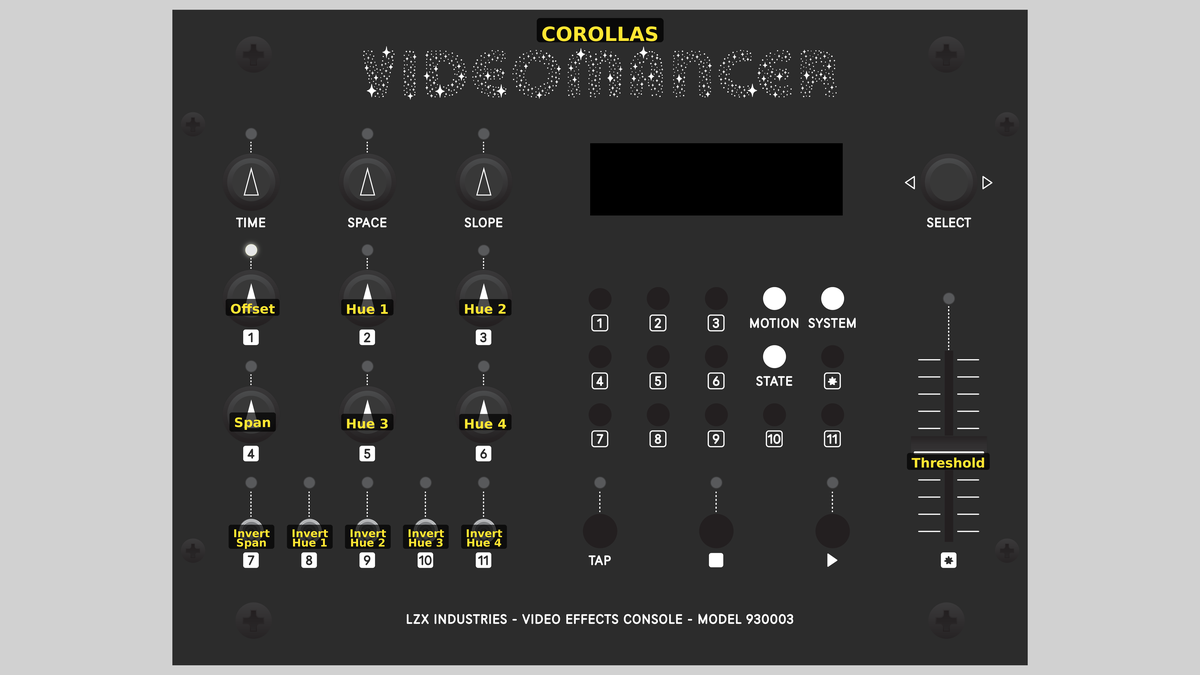 Videomancer's front panel with Corollas active. Knobs 1–6 (top two rows of left cluster), Toggle switches 7–11 (bottom row of left cluster), Fader 12 (right side).
Knob 1 — Offset
| Property | Value |
|---|---|
| Range | -100.0% – 100.0% |
| Default | 0.1% |
Offset controls the brightness bias applied to the input luminance before frequency folding begins. This is the brightness parameter of the proc amp stage. At the center position (0.0%), the input passes at its original level. Turning counterclockwise darkens the pre-processed signal; turning clockwise brightens it. Shifting the offset moves the folding point relative to the input content, changing where the petal patterns appear in the tonal range.
Sweeping Offset through the full range animates the patterns like a kaleidoscope. Subtle adjustments near center produce the most musically interesting variations.
Knob 2 — Hue 1
| Property | Value |
|---|---|
| Range | 0.0% – 100.0% |
| Default | 0.0% |
Hue 1 adds a constant offset to the 2× harmonic before it is mixed into the Y (luminance) output. At 0.0%, no offset is applied: the harmonic passes at its natural level. Increasing Hue 1 shifts the DC level of the 2× harmonic upward, brightening the contribution of this layer to the luminance channel.
Knob 3 — Hue 2
| Property | Value |
|---|---|
| Range | 0.0% – 100.0% |
| Default | 0.0% |
Hue 2 adds a constant offset to the 4× harmonic before it is mixed into the Y (luminance) output. This works identically to Hue 1 but affects the higher-frequency 4× layer. Because the Y output is the average of the 2× and 4× harmonics, adjusting Hue 2 shifts the overall brightness while also changing the relative balance between the two luminance harmonics.
Knob 4 — Span
| Property | Value |
|---|---|
| Range | 0.0% – 200.0% |
| Default | 100.1% |
Span controls the contrast of the input luminance before frequency folding. This is the contrast parameter of the proc amp stage. At 100.0%, the input passes at its original contrast. Lower values compress the tonal range toward the center, producing gentler folds with less harmonic content. Higher values stretch the range, driving more of the signal past the folding point and creating more pronounced petal patterns with sharper edges.
Span and Offset interact. Offset centers the signal, and Span stretches it from that center. Together they position and scale the input within the folding region.
Knob 5 — Hue 3
| Property | Value |
|---|---|
| Range | 0.0% – 100.0% |
| Default | 0.0% |
Hue 3 adds a constant offset to the 8× harmonic. This harmonic is routed to the U (blue-difference) chrominance channel. At 0.0%, the U channel sits at the neutral midpoint, producing no color. Increasing Hue 3 pushes U away from neutral, introducing color. Because U and V together define hue and saturation, adjusting Hue 3 shifts the color balance of the 8× harmonic layer.
Knob 6 — Hue 4
| Property | Value |
|---|---|
| Range | 0.0% – 100.0% |
| Default | 0.0% |
Hue 4 adds a constant offset to the 16× harmonic. This harmonic is routed to the V (red-difference) chrominance channel. At 0.0%, the V channel sits at the neutral midpoint. Increasing Hue 4 introduces color in the red-cyan axis. Combined with Hue 3, the two chroma offsets define the overall hue of the high-frequency pattern layers.
Set Hue 3 and Hue 4 to different values to create color contrast between the 8× and 16× layers. The fine detail of the 16× pattern appears in a different hue than the coarser 8× structure.
Switch 7 — Invert Span
| Property | Value |
|---|---|
| Off | Off |
| On | On |
| Default | Off |
Invert Span flips the base signal after the proc amp stage and before the frequency doublers. When set to On, all values are bitwise-inverted, reversing the luminance content. Every downstream harmonic inherits this inversion, producing the complementary arrangement of all petal patterns simultaneously.
Switch 8 — Invert Hue 1
| Property | Value |
|---|---|
| Off | Off |
| On | On |
| Default | Off |
Invert Hue 1 inverts the 2× harmonic before its hue offset is added. When On, the 2× pattern flips: bright regions become dark and dark becomes bright within that single harmonic layer. This changes the luminance contribution of the 2× layer while leaving the 4× layer and the chroma harmonics unchanged.
Switch 9 — Invert Hue 2
| Property | Value |
|---|---|
| Off | Off |
| On | On |
| Default | Off |
Invert Hue 2 inverts the 4× harmonic before its hue offset is added. When On, the 4× luminance pattern flips independently of the 2× layer. Because the Y output averages these two harmonics, inverting one creates destructive interference in some regions and constructive interference in others.
Inverting one luminance harmonic while leaving the other normal creates asymmetric petal patterns (bright where they agree, mid-gray where they conflict.)
Switch 10 — Invert Hue 3
| Property | Value |
|---|---|
| Off | Off |
| On | On |
| Default | Off |
Invert Hue 3 inverts the 8× harmonic before its hue offset is added. This affects the U (blue-difference) chrominance channel. When On, the 8× chroma pattern reverses its polarity, shifting colors on the blue-yellow axis.
Switch 11 — Invert Hue 4
| Property | Value |
|---|---|
| Off | Off |
| On | On |
| Default | Off |
Invert Hue 4 inverts the 16× harmonic before its hue offset is added. This affects the V (red-difference) chrominance channel. When On, the 16× chroma pattern reverses polarity, shifting colors on the red-cyan axis.
Fader 12 — Threshold
| Property | Value |
|---|---|
| Range | 0.0% – 100.0% |
| Default | 0.0% |
Threshold applies a luminance key at the final output stage. Any pixel whose processed Y value falls below the threshold is replaced with black (Y = 0) and neutral color (U = 512, V = 512). At 0.0, everything passes through, disabling the key. As Threshold increases, darker regions of the harmonic pattern are keyed out, isolating the brightest petals.
Threshold is especially effective after strong harmonic processing. The repeated folding creates well-defined brightness peaks and valleys, and the threshold carves cleanly between them, producing sharp petal silhouettes against a black field.
Background
Frequency Doubling
The core DSP operation of Corollas is frequency doubling, also known as full-wave rectification in the analog domain. Imagine a ramp signal: values rising smoothly from 0 to maximum. The frequency doubler folds this ramp at its midpoint. Values below the midpoint are scaled upward (multiplied by 2). Values above the midpoint are mirrored downward and scaled. The result is a triangle wave with twice the frequency of the original ramp.
Feed that triangle back through another doubler, and you get a signal at 4× the original frequency. A third doubler produces 8×, and a fourth produces 16×. Each stage doubles the number of peaks and valleys, creating progressively finer patterns: like the branching veins of a leaf or the layered petals of a flower.
Harmonic Distribution
Corollas uses four cascaded frequency doublers to generate harmonics at 2×, 4×, 8×, and 16× the input signal frequency. These harmonics are then distributed across the three YUV channels:
- Y (luminance) receives the average of the 2× and 4× harmonics
- U (blue-difference chroma) receives the 8× harmonic, biased to the neutral midpoint
- V (red-difference chroma) receives the 16× harmonic, biased to the neutral midpoint
This mapping places the coarsest harmonic structures in luminance and the finest in color. The human eye is more sensitive to luminance detail, so the lower harmonics define the overall "shape" of the pattern while the higher harmonics paint "color" in finer detail.
The Proc Amp Stage
Before any folding occurs, the input luminance passes through a processing amplifier (proc amp). This gain-and-offset stage applies the Span (contrast) and Offset (brightness) controls using the formula:
output = (input − 512) × Span / 512 + Offset
The proc amp positions and scales the input signal within the folding range. A narrow span produces gentle folds with broad, rounded peaks. A wide span drives the signal hard through the folding stages, creating sharp, well-defined harmonics with more fine detail. The offset shifts where the folding occurs relative to the image content.
Signal Flow
Signal Flow Notes
The most important architectural feature of Corollas is that input U and V channels are not used. The output is constructed entirely from the input luminance. This makes Corollas a luminance-to-color converter: it reads brightness and writes brightness, hue, and saturation.
Two key interactions shape the output:
-
Span and Offset control the harmonic content. The proc amp positions the input signal within the folding range. Because frequency doubling is nonlinear, small changes in Span or Offset can produce dramatic shifts in the output pattern. This is the primary performance control pair.
-
Harmonic inversion creates interference. Each harmonic can be independently inverted before its offset is added. When two harmonics that contribute to the same output channel (e.g., the 2× and 4× harmonics in Y) have opposite phases, they interfere destructively in some regions and constructively in others, creating complex patterns from simple inputs.
Because input U and V are discarded, Corollas converts any color input to a luminance-derived palette. To preserve the original colors, chain Corollas with a downstream mixer.
Exercises
These exercises explore the harmonic layers of Corollas, building from simple luminance folding to full-spectrum petal patterns.
Exercise 1: Triangle Wave Folding
 Triangle Wave Folding — simulated result across source images.
Exercise Illustration
A description of the exercise illustration.
Learning Outcomes
Understand how frequency doubling creates symmetrical fold patterns from input luminance.
Key Concepts
- Frequency doubling folds a ramp at the midpoint, creating a triangle
- Cascading doublers multiplies the frequency geometrically (2×, 4×, 8×, 16×)
- The proc amp controls how much of the input range passes through the folding stages
Video Source
A gradient test pattern or any footage with smooth tonal transitions such as skies or slow camera pans.
Steps
- Baseline: Set Span (Knob 4) to about 100.0%. Set Offset (Knob 1) to center (0.0%). All Hue knobs to 0.0%. All toggles Off. Threshold at 0.0.
- Fold pattern: With a gradient input, the smooth ramp transforms into a symmetrical triangle pattern. Bright and dark regions fold into mirrored peaks.
- Increase Span: Slowly turn Span clockwise past 100%. The signal drives harder into the folding stages. More peaks appear as the harmonics grow stronger.
- Sweep Offset: Move Offset across its full range. The entire fold pattern slides through the brightness content like a kaleidoscope.
- Invert: Toggle Invert Span (Switch 7). The fold pattern complements (peaks become valleys and valleys become peaks.)
Settings
| Control | Value |
|---|---|
| Offset | 0.0% |
| Hue 1 | 0.0% |
| Hue 2 | 0.0% |
| Span | ~150.0% |
| Hue 3 | 0.0% |
| Hue 4 | 0.0% |
| Invert Span | Off |
| Invert Hue 1 | Off |
| Invert Hue 2 | Off |
| Invert Hue 3 | Off |
| Invert Hue 4 | Off |
| Threshold | 0.0 |
Exercise 2: Chroma Petals
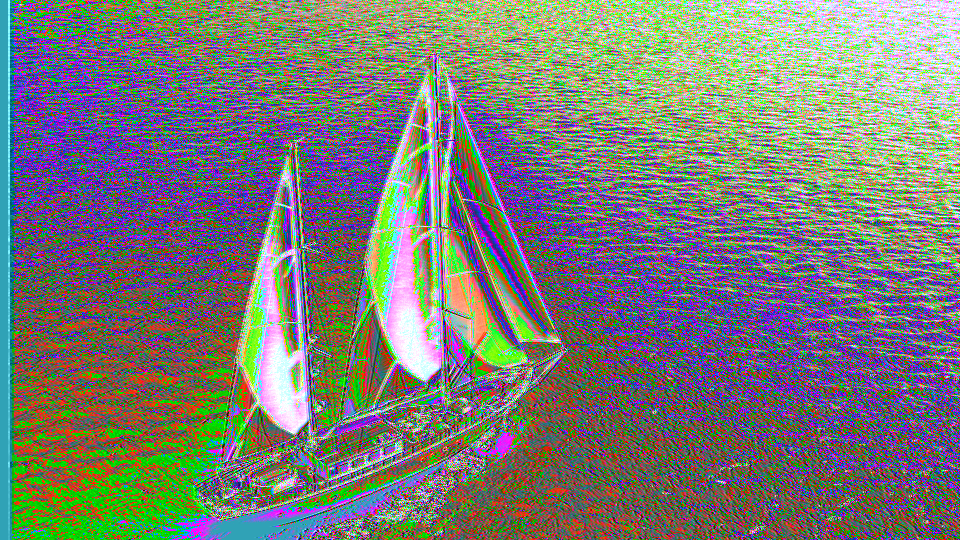 Chroma Petals — simulated result across source images.
Exercise Illustration
A description of the exercise illustration.
Learning Outcomes
Explore how harmonic offsets create color from luminance.
Key Concepts
- The 8× and 16× harmonics generate the U and V chroma channels
- Hue offsets push chroma away from neutral, introducing visible color
- Different offset combinations create different hues
Video Source
A camera feed with recognizable subjects and moderate contrast.
Steps
- Prepare: Begin with the settings from Exercise 1.
- Add U color: Turn Hue 3 (Knob 5) clockwise to about 50.0%. Color appears as the 8× harmonic pattern drives the U channel.
- Add V color: Turn Hue 4 (Knob 6) clockwise to about 50.0%. A second color component emerges as the 16× harmonic drives the V channel.
- Invert one chroma: Toggle Invert Hue 3 (Switch 10). The U channel color flips polarity, shifting the overall hue dramatically.
- Balance: Experiment with different Hue 3 and Hue 4 ratios. Equal values create one palette; unequal values create another.
Settings
| Control | Value |
|---|---|
| Offset | 0.0% |
| Hue 1 | 0.0% |
| Hue 2 | 0.0% |
| Span | ~150.0% |
| Hue 3 | ~50.0% |
| Hue 4 | ~50.0% |
| Invert Span | Off |
| Invert Hue 1 | Off |
| Invert Hue 2 | Off |
| Invert Hue 3 | On |
| Invert Hue 4 | Off |
| Threshold | 0.0 |
Exercise 3: Petal Isolation
 Petal Isolation — simulated result across source images.
Exercise Illustration
A description of the exercise illustration.
Learning Outcomes
Combine all controls to isolate specific harmonic layers and carve petal silhouettes.
Key Concepts
- Threshold keys out dark areas, isolating bright harmonic peaks
- Per-harmonic inversion creates complex interference between layers
- The full parameter set works together as a single sculptural instrument
Video Source
High-contrast footage or a black-and-white test pattern with sharp edges.
Steps
- Prepare: Set Span to ~180.0%, Offset near center.
- Color the petals: Set Hue 3 to ~70.0% and Hue 4 to ~30.0% for asymmetric coloring.
- Shift luminance balance: Increase Hue 1 to ~40.0% and leave Hue 2 at 0.0%. The 2× harmonic brightens while 4× stays dark, creating uneven luminance layering.
- Invert for interference: Toggle Invert Hue 2 (Switch 9). The 4× layer flips, creating constructive and destructive interference with the 2× layer in the luminance channel.
- Key the petals: Slowly raise Threshold (Fader 12) until only the brightest harmonic peaks survive. The output becomes sharp petal shapes against black.
- Flip the base: Toggle Invert Span (Switch 7) to produce the complementary petal arrangement.
Settings
| Control | Value |
|---|---|
| Offset | 0.0% |
| Hue 1 | ~40.0% |
| Hue 2 | 0.0% |
| Span | ~180.0% |
| Hue 3 | ~70.0% |
| Hue 4 | ~30.0% |
| Invert Span | Off |
| Invert Hue 1 | Off |
| Invert Hue 2 | On |
| Invert Hue 3 | Off |
| Invert Hue 4 | Off |
| Threshold | ~50.0 |
Glossary
-
Chrominance (U, V): The color-difference components of a YUV signal. U encodes blue-yellow variation; V encodes red-cyan variation.
-
Frequency Doubling: Folding a signal at its midpoint, reflecting values above the center downward, effectively doubling the spatial frequency of ramp-like patterns.
-
Full-Wave Rectification: The analog equivalent of frequency doubling; both halves of a waveform are folded to the same polarity.
-
Harmonic: A signal whose frequency is an integer multiple of a fundamental frequency. Corollas generates the 2nd, 4th, 8th, and 16th harmonics.
-
Interference: The combination of two signals that reinforce (constructive) or cancel (destructive) in different regions, creating complex patterns from simple inputs.
-
Luminance (Y): The brightness component of a YUV video signal, representing perceived lightness.
-
Midpoint: The center value of the signal range (512 in 10-bit video). The frequency doubler folds the signal at this point.
-
Proc Amp: Processing Amplifier; a gain-and-offset stage that applies contrast and brightness adjustment before downstream processing.
-
Threshold Key: A gating operation that replaces any pixel below a brightness cutoff with black and neutral color.